

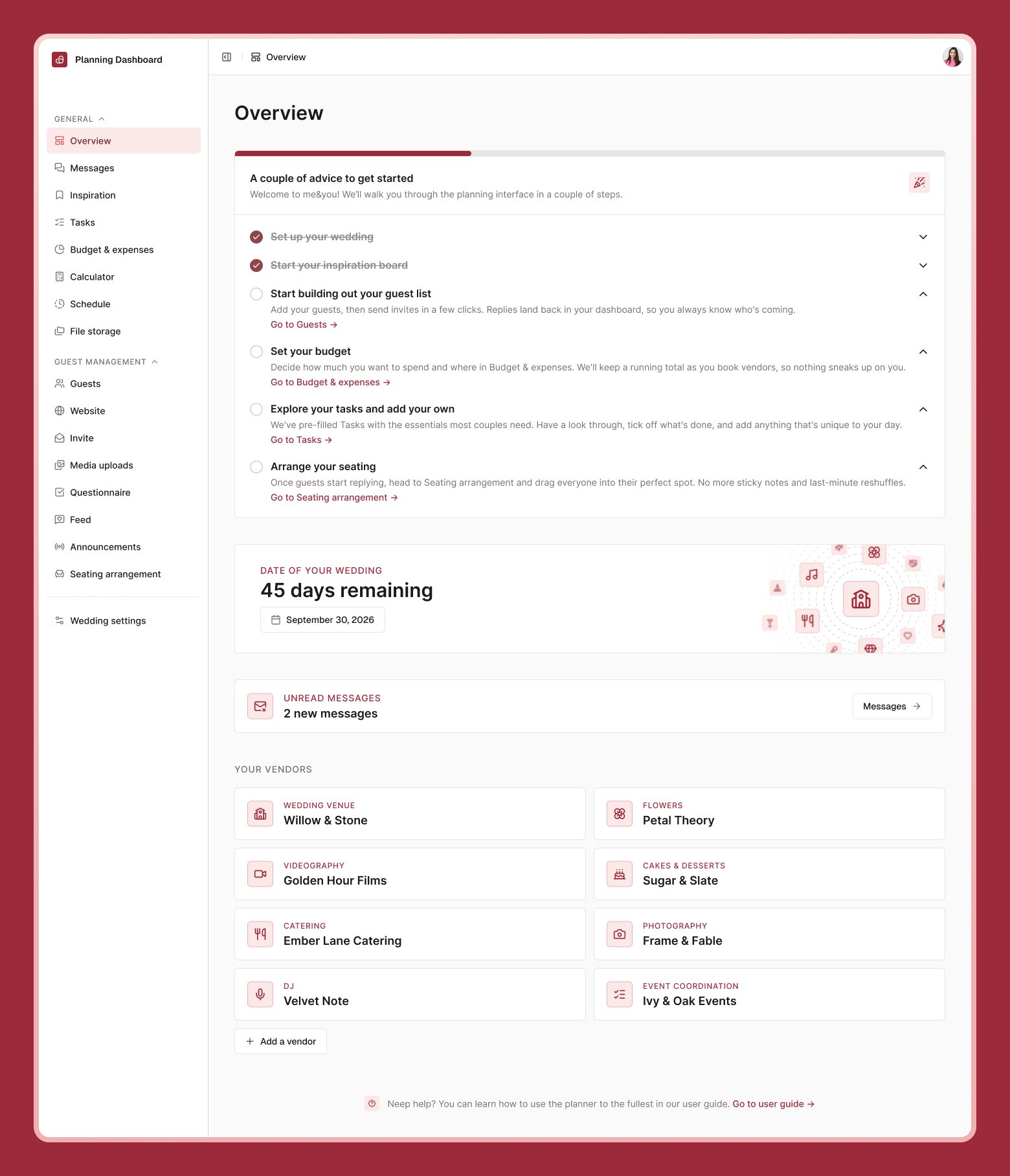
Getting-started checklist
A short list of first steps — things like setting up Wedding settings, exploring Inspiration, adding guests, setting a budget, and adding tasks. Each item links straight to the relevant page. It’s meant to be a starting point, not a strict order.Countdown
A live countdown to your wedding date. If you haven’t set a date yet, select it here — your date also drives recommended task deadlines and your guest-facing schedule, so it’s worth adding early.Changing your wedding date after you’ve already added recommended tasks may prompt you to recalculate their due dates to match the new date.
Unread messages
If anyone planning with you has sent a message you haven’t seen, you’ll see an alert here linking to Messages.Your vendors
Keep a running list of the people and businesses helping bring your wedding to life — venue, catering, photographer, and more.1
Select Add vendor
Choose a category (venue, catering, photography, etc.).
2
Fill in the details
Name, contact information, and any notes.
3
Save
Your vendor appears in the list, and venues you add here can also be reused on your wedding website and invitation.
For vendors with the type “Venue”, you can also input their location. This will be then rendered on your wedding website and invite.